środa, 3 maja 2017

Everything is Terrible by Ferd T-H

http://ferd.ca/tout-est-terrible.html


As bad as anything else

2017 04 21

Tout est Terrible

This entry is a translated loose transcription of a talk I gave at the Web a Quebec conference in April 2017 named "Tout est Terrible".

So, everything is terrible. That's a bit funny to say since so far in this conference, there's been a lot of talks about the amazing future and all the things new technology enables. All the new avenues and devices that should make our lives easier. People who know me are aware that I generally have a very cynical view of technology, and I'm personally scared of all these connected devices that obey my every word some other speakers are excited about.
Mostly, that's because the more time I code and spend in this industry, the more I know how things work behind the scenes, and the least trustworthy the whole thing appears to me. That's how I picked the picture for this slide, it's called "The Triumph of Death" by Pieter Bruegel and it's a bit how I feel about a connected home.
What I want to show is that we can have this very simple and basic application that looks very, very reasonable, and show a bunch of issues and potential bugs that can hide in it and surprise us in nasty ways, and that it's hard to really feel safe about any code out there. This is gonna be a spooky scary story!
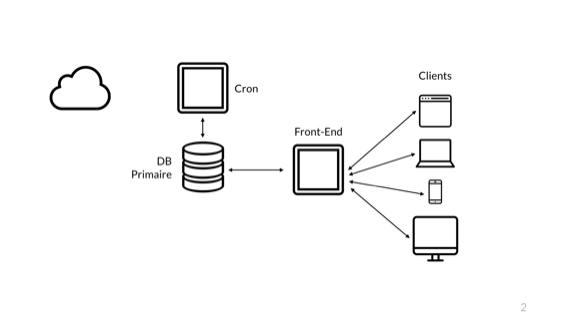
To show my point, I want to start with a basic application, one that mostly any developer in this room will have a fairly intuitive feeling for. Here I have my little web application. My users on the right have their own devices, that they use to connect to my front-end server, which runs some language that executes logic. That language connects to a database where it stores data. Then there's that cron job server used for some background tasks, maybe it's not used super hard. And then you have the cloud, which is likely used by a bunch of other stuff in the system. Maybe you store images in S3 or whatever.
So that's a reasonable app, but it's too easy to find problems in it: any machine goes down and things go bad. Instead, we'll look at this one:
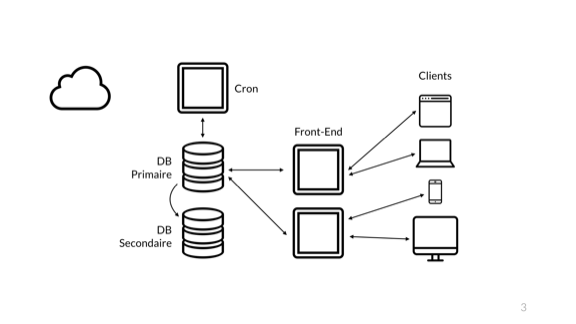
That's a safer one. I now have a redundant front-end, where I can deploy to one of them or have it break and still be accessible to our customers. The second database node gives us a hot-failover in case of problems, but it's not a back up solution. You just need one person to DROP TABLE users; with live replication to lose that hot standby so let's say we do the reasonable thing and we have a back up in that cloud over there.
Then there's still just one cron server because async tasks maybe are okay to replay just later. That's better. Our architecture is solid enough to get comfortable and start to worry about just the code.
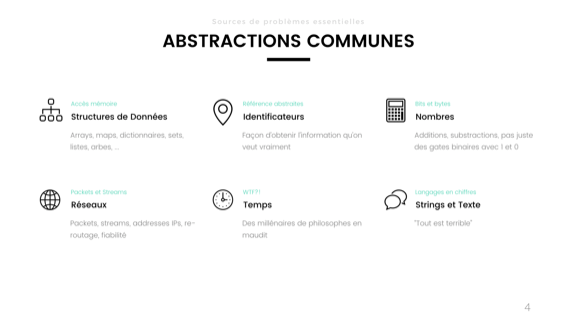
Here's a bunch of common abstractions.
You've got data structures on the top left; those are your trees, maps, arrays, dictionaries, sets, lists, and so on. They let us structure information in something else than raw bits in memory. That's obviously good.
Then we've got the identifiers. I consider them an abstraction. They can be your auto-incrementing IDs in a database, a UUID or a GUID, but also a variable, a pointer, or a URL or URI. They basically let you refer to a logical entity, piece of data or object, without having to describe it fully. They're usually bound by some context to give them sense. I can say "you're John" and people who know a given John will have a an idea of who John is that is related to the person they know, with things like height, occupation, age, and so on. Identifiers let us have a thing that stands in for the whole true item.
Then we've got numbers. Nobody in here today could raise their hands and say they implement their own half-adder in every project they make. We mostly just use numbers directly and don't go around wrangling bits by hand anymore.
Bottom left, we've got the network. That stuff is just abstractions top to bottom. There are your connections, ordered streams of data, IP addresses and port numbers (which are also identifiers!), packets, and so on. We fortunately don't just handle electric signals down a cable by hand in there.
Then we have time, and here I'm not gonna describe time because it took philosophers, metaphysicians, and scientists millenia of arguing to get to our approximate understanding of today.
Then we have strings, our general "whatever fits" storage for a bunch of stuff we don't know how to represent.
Each of these critical tools we have are essential for us to be able to do work and accomplish tasks without knowing everything from the entire stack and having to know the decades of science, math, and engineering required to build these things. Yet, if we aren't aware of some of the limitations of these abstractions and we use them in ways that clash with their actual properties, they can just straight up bite us in the ass.
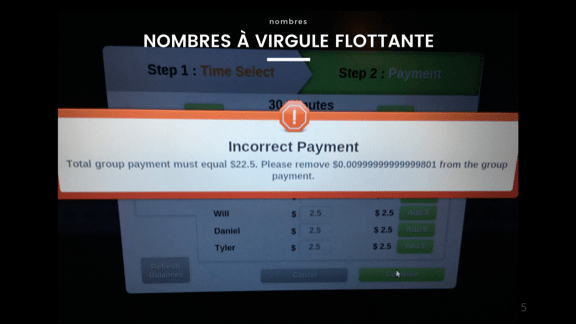
Let's start with an easy one, floating point numbers. If you've seen 0.1 + 0.2 be equal to 0.30000000000000004, you know what this is. There's an infinity of numbers between 0.1 and 0.2, but we only have a limited number of bytes to represent them. Some numbers don't divide up exactly, and without working in fractions it's gonna be very hard not to go and lose precision where the computer starts fudging the numbers up so they make sense.
You may have seen this whenever working with money. The trick is to never use floating point numbers to work with money if you don't want it disappearing. Always use the smallest indivisible unit you'll need and work from there. I don't care if it's cents, millidollars, picodolloars or femtodollars, just don't use floats.
I've heard of a cool project where a bank tried to put a wrapper around their old code base using node.js. Unfortunately for them, nobody told the team about the fact Javascript only has floating point numbers, and they had to scrap the project.
Speaking of which, languages with only floats like javascript have an upper limit on the precision of integers; 2^53 in this case.
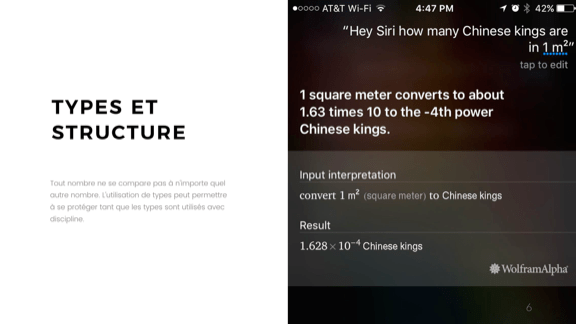
With integers it's a bit easier. For the most part, people know and understand the limitations to a much greater extent and it helps. But that's not enough; you need to have the proper structure and type usage since not all integers stand for the same thing. Just think of the Mars Climate Orbiter, which failed because some bits of code worked in imperial units and others worked in metric. Whoops.
On the image here we get a specific view of these confused units. Ask siri or wolfram alpha how many Chinese kings are in one squared meter and you get 1.628*10^-4. Not quite sure what that means, but it still reliably does it.
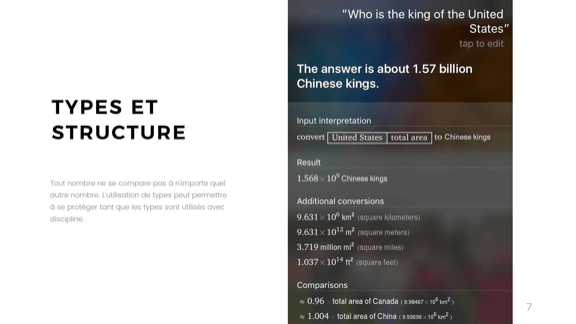
It gets even better when you lay on some language processing. I can't figure out why, but "Who is the king of the United States" gets answered with 1.57 billion Chinese kings.
That kind of error is usually fairly simple to prevent. Be careful, and if you have a fancy type system, use it fully. Don't go for 'integer' for all of your types, specify what the integers represent, what their unit is.
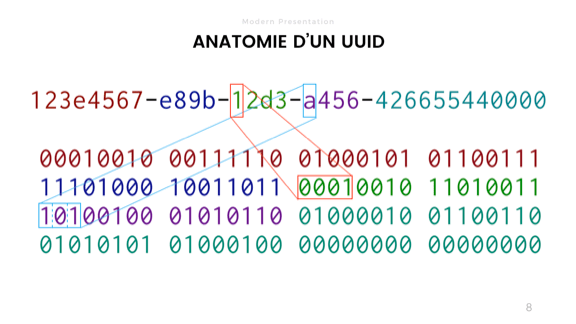
So let's say that my application handles its redundancy fine, and then got its numbers game fine also. Maybe I even get users. Now I'll look at fancy things like sharding, or maybe I'll just work with external services. In either cases, I'll likely get UUIDs or GUIDs thrown my way, since they can 'guarantee' uniqueness without being predictable.
A UUID is just a bunch of bits that you compare. If all are the same, the identifier matches. If not, then it's different. There's a bunch of different varieties, some random, some time or address-based.
The way we usually see UUIDs though is the one on top of the slide, with hex numbers split by dashes. That's a bit risky.
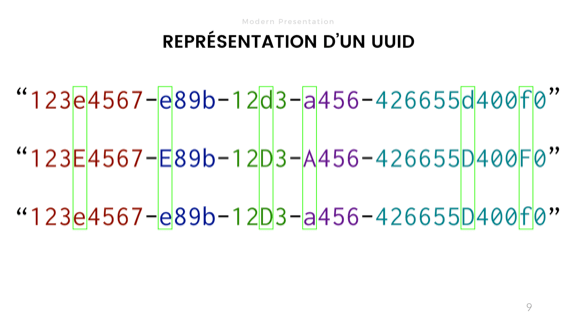
Depending on the language or stack you use, you may have libraries that let you store UUIDs as binary blobs in memory. Or you may have to use strings to store their abstracted representations. In some case, you have to use strings as an intermediary format, say when transmitting the information over various systems that do not support raw binary data, such as SQL queries or JSON.
There lies the risk. By default, most strings in most languages have comparison operators that are case sensitive. This means that these 3 UUIDs, despite being identical in their authentic binary representation, wouldn't compare as equal as strings. Case insensitivity is warranted and must be explicitly considered by your system because the string representation is not a perfect abstraction of the true properties of the UUID.
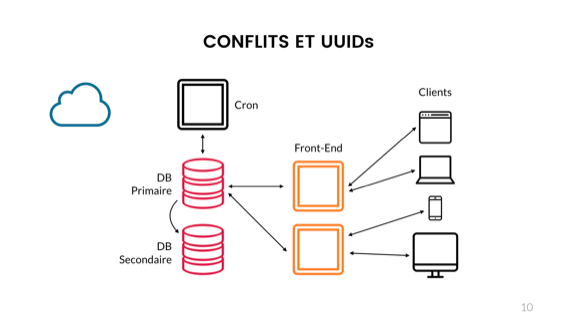
In fact, this can cause major headaches if your various components do not all use the same exact representation. Your clients, front-end, back-ends, databases, and cloud services must all either do case insensitivity or agree to a common representation.
For specific languages, specific libraries are required, some which will and some which won't do things right. Databases can be tricky:
  • If you use PostgreSQL, you get a case-insensitive comparison, but a lowercase representation.
  • MySQL supports generating uppercase UUIDs, but has no storage format for them. A VARCHAR is recommended, which is case sensitive
  • MSSQL can store GUIDs, but goes for an uppercase representation
  • Oracle can store raw data, so should be okay
  • Redis has no support for UUIDs and likely you'll use a case-sensitive string
  • MongoDB actually does things right and uses a binary representation.
But even if you do it fine on your end, nothing is guaranteed to work. You only need one subsystem to break things. For example, external services like some of Amazon have multiple varied offerings that don't all agree with each other (DynamoDB and SimpleDB are both case-sensitive, for example, so a third AWS service using these internally possibly inherits these properties). If that happens to you and you use, say, PostgreSQL locally and store UUIDs as UUIDs, then you'll be in the bad situation where objects could theoretically conflict with each other, or just vanish as your local lowercase representation is seen as non-existing to an uppercase service.
Any single part of the system not doing it like the rest can cause issues. Then you'll be stuck having to store a canonical UUID (for comparisons) with a string copy of it (for its origin version) or you'll have to figure out and document how each service internally stores stuff. Not fun.
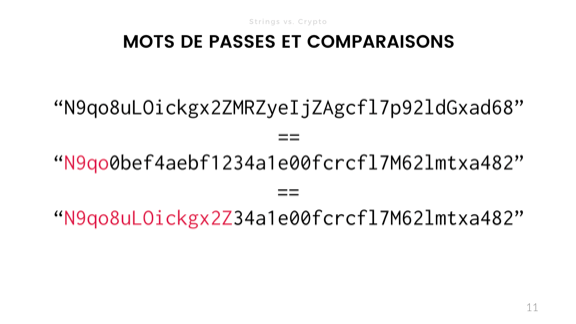
But string comparisons can bring us more problems. Another interesting property of strings being compared (but not just strings, most arrays and data structures also), is that you want the operation to go as fast as possible.
If I'm comparing the following password hashes, with the topmost one being the correct one, and the second and third ones being other attempts, the moment my '==' operator hits a difference, it bails out and returns 'false'.
Now that's interesting because the duration of the computation is information. In security and cryptography, we want to hide as much information as possible. What an attacker could do then is send many, many requests with various guesses, and then see, based on how long it takes, how close the guess is to the solution. This can leak information about the hash value and inform further guesses in time.
That's essentially what a time-based attack is, although there's more types of it than just that.
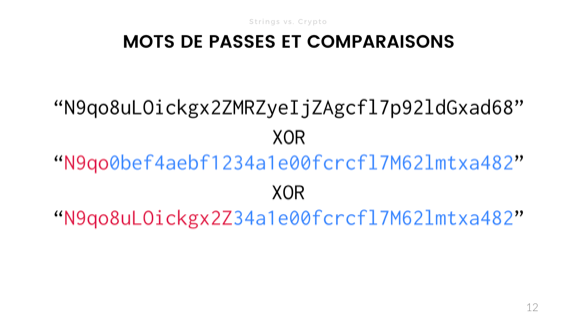
The way around this is to replace our comparison operator with an exclusive OR. Set a value to false, and then compare bit by bit or byte by byte with the XOR. Every time both values are the same, it returns a 0 (false) and every time the values are different it returns a 1 (true). OR that result into the initial value and if it's not 0 at the end, you know there's a difference.
You still have to be careful to ensure that you don't leak information about the length of data or that specific optimizations don't hurt you. Good cryptographic libraries do this for you anyway. Use bcrypt or scrypt and you should be fine for passwords, but the more you know the better.
It's one of the funny things of cryptography that sometimes you want things to be as slow as possible in terms of design, but as fast as possible in the implementation, since that prevents brute force attacks
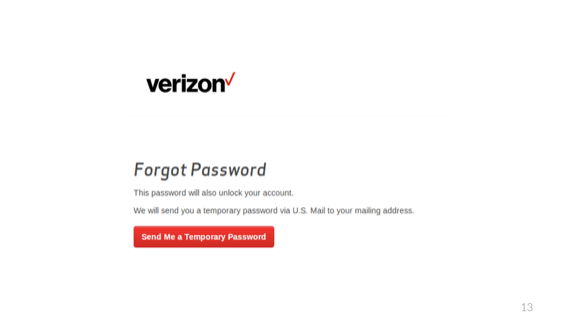
Of course some organizations take this a bit too much to heart and their slowness is not really mandated!
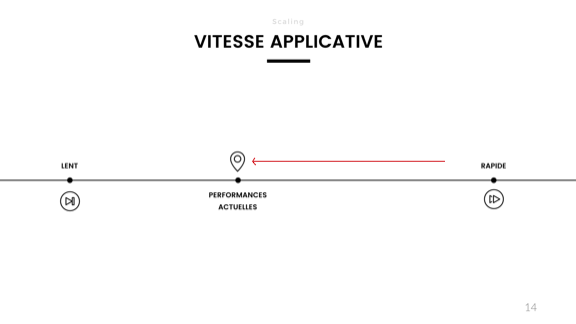
So we've got that fancy application, it now handles redundancy, integers, floats, UUIDs, and passwords fine. I'm getting a lot more users, and performance starts to degrade when I measure the response time. I've read these blog posts that tell me that I lose an important percentage of my users with each tenth of a second spent not responding, and it's time to react!
Some operations take longer and stall the rest, and generally it's just really hard to predict things, and peak times are annoying. Someone on the team comes with an idea that would solve all problems. What is it?
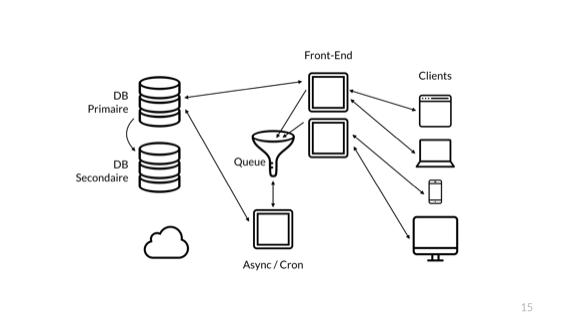
Stick a queue in it! The front-end server just sends its short easy requests to the DB directly, and all the complex ones that take time are sent to the queue. The queue accepts without processing and I can quickly return the results to my users.
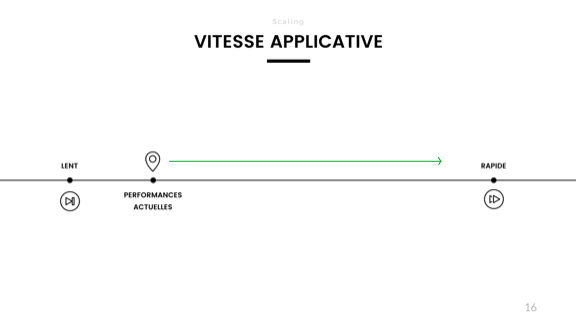
And suddenly, all my performance is back. Hell, it's even faster than before!
There's a problem looming, though.
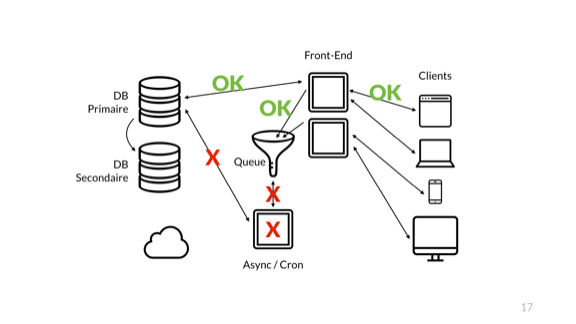
When we added a queue, the interesting thing that happened is that I stopped conveying the overall health of the system to the front-end. Whereas earlier the users of my system could see whether their requests entirety worked by virtue of returning the result of the end-to-end operation, the usage of a queue broke this concept.
Right now, the front-end only lets us know whether its direct connections are healthy. We have no clue regarding the consumer of the queue, about the async server, or the async server's ability to talk to the database or the async queue itself.
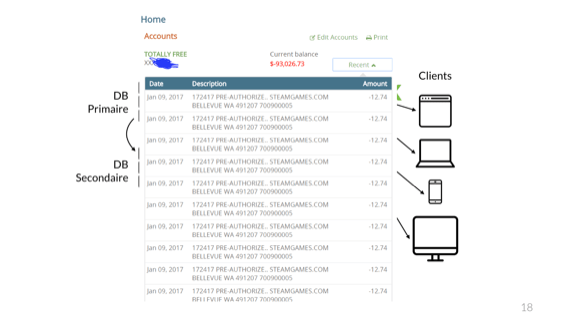
In fact, if work is not done carefully, events can repeat itself. Here's a reddit user who bought a $12.74 game and got charged for it so many times despite buying it only once his bank account got overdraft to -$93k.
There's no clear guarantee the issue here is specifically caused by a queue, but I've personally seen many that looked just like that in these situations. When things go wrong and the end-to-end flow of data gets to break up in mysterious ways, the effects are usually very noticeable.
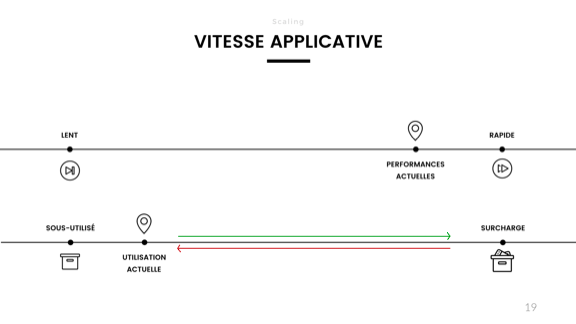
But there's more. The reason my application initially got slow was because it was being overloaded. Right now though, I have entirely disjointed the perceived performance from the actual load in the system.
No matter how bad things get in the back-end, the front-end performance does not budge. This was good in the case of temporary overload for some large operations, but is pretty bad when it comes to long-term stability. By monitoring front-end performance we inherently had the pulse of the whole system. By splitting up the system in two parts, my front-end monitoring not only shows the health, but also the performance of half the system.
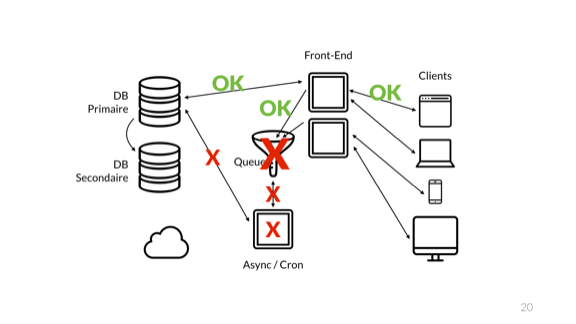
And eventually, the queue overflows and crashes. Of course it does not crash alone
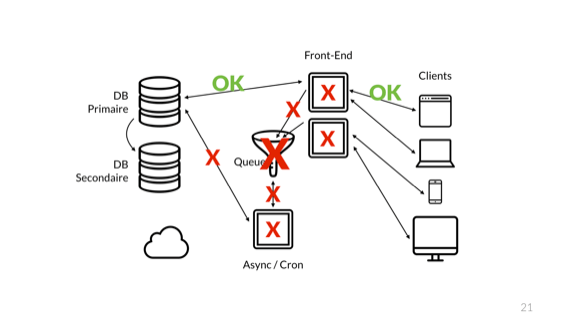
The error then blows up to the front-end nodes and we cascade to a full catastrophic failures.
So what do we do? Someone calls a meeting, says it is unacceptable for this to happen. So what do developers do?
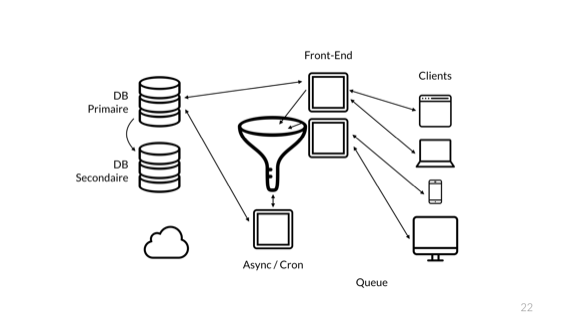
Make it a bigger queue. But there's more. Since during the crash all the data in flight in the queue was lost, everyone also agrees to make it a persistent queue. That slows it down, and since we love redundancy, why not add another one?
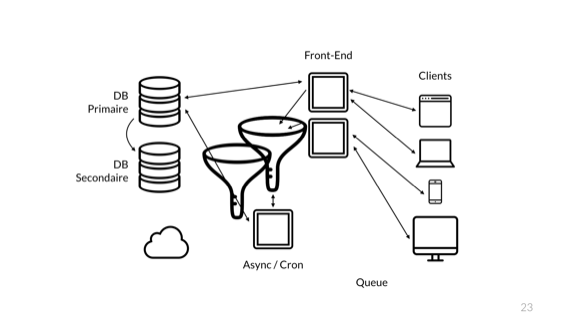
And the next time the error happens, we can do the same again.
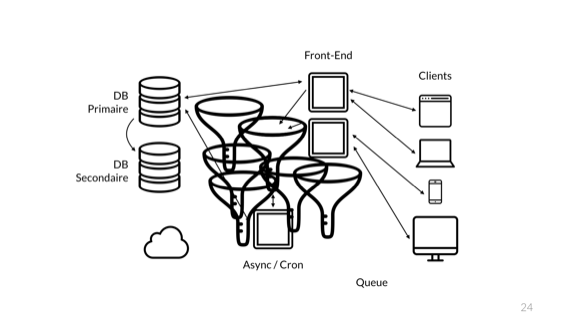
All those queues are pretty good. But we're a cool and good company and so we want next gen tech. We all know this architecture diagram is terrible. So we do the proper thing...
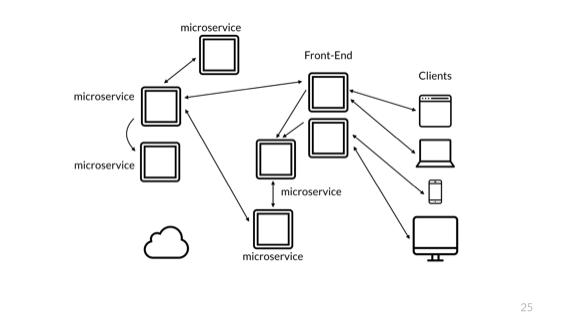
Aww yiss, microservices!
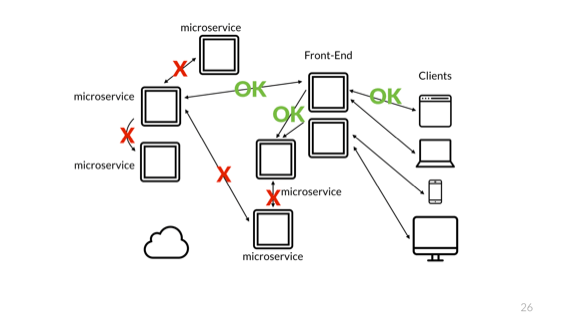
Of course the problem is exactly the same. The big issue still has to do with the monitoring of only a partial system. Changes in architecture like that should be seamless to users, but have very important impacts to the team maintaining and operating the system.
Conflating the user and the operator, or omitting either of them is a killer mistake for your project, and for them. Operations get very tricky.
Of course that's not all! All our components have to be able to talk to each other.
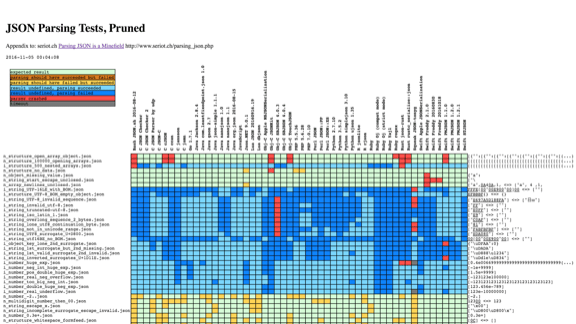
We could pick something like JSON. This is a chart from seriot.ch, observing about 50 implementations of JSON libraries across more than 10 different languages.
Almost every one of them handles some things differently.
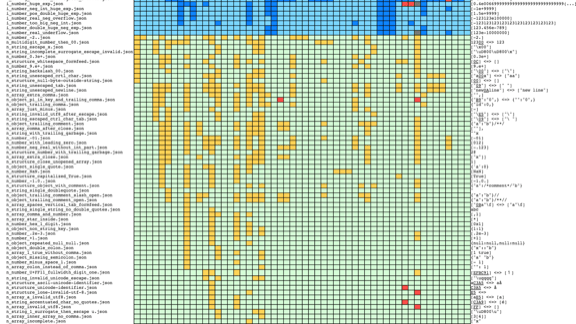
That's not great
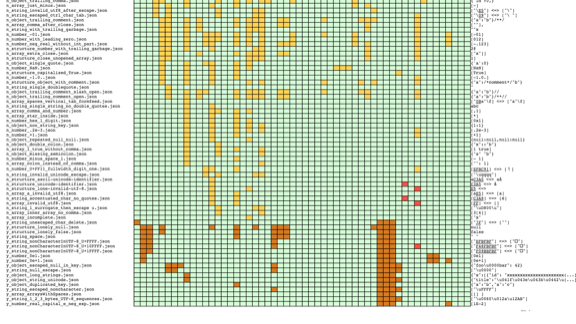
The JSON standard is very small, but this likely means it gives a lot of place to interpretation, and therefore to special unorthodox behaviour.
The fun bit is that if you run many microservices and send the same carefully crafted data set to all of them, you can generate confusing behaviours. Take for example the case of an invalid JSON map that contains the same key multiple times, with different values. Say I have an object 'person' where the 'name' attribute appears twice, once with the name 'Mark' and once with the name 'John'.
It's entirely possible that any parser behaves in one of three ways:
  1. refuse to parse the record, as it should
  2. keep the first name (Mark)
  3. keep the second name (John)
The latter two may happen depending of the order of parsing (using a stack or going in order) with lax validation.
If I have 3 services each having their own version of each behaviour, I have one service that will stall and crash and refuse to handle the record, and then two different services that see different values for the same object. Handle with care.
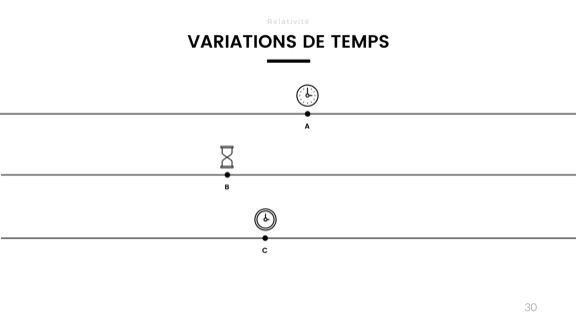
Another problem has to do with time. Different clocks go at different speeds. I made the experiment last year for a presentation on calendars (no, don't laugh, calendars are actually super interesting), where I disabled clock synchronization on my computer.
I then checked it against my oven and my microwave oven to see which would drift the most. After about 3 or 4 weeks, the microwave oven had about 3 minutes of drift. My laptop itself had drifted roughly 2 minutes and 16 seconds. The oven, for its own, had remained pretty much on time.
Clocks change based on hardware, temperature, voltage, humidity, and so on. They just can't be trusted to be accurate over longer periods of time.
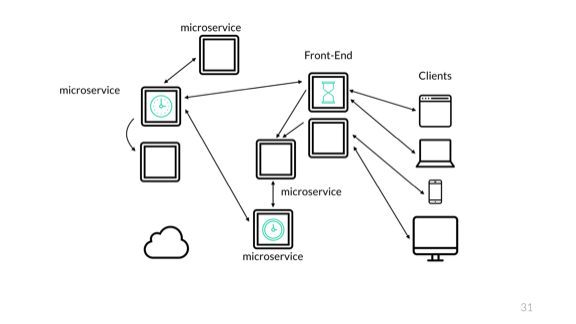
This means that without synchronization, a set of timestamps for the same event can all become disjoint and give very odd results. So you want to be using NTP and keeping an eye on it to make sure it doesn't drift too much. Even then, for very rapid events, NTP can have enough variation to cause issues.
And that can even happen on a single machine. At a previous job, we once crashed a hadoop cluster. What happened was that we would run quick bids on the millisecond scale, and would take time stamps at two points: when receiving the request and when finishing the bid. We could then use either to log the event and could calculate the time difference to know how long the whole processing took.
On a fateful day, on a transaction that ran particularly fast, the NTP synchronization of the computer clock drifted it back by a few parts of a second, just enough to apparently allow the second timestamp to give a time prior to the first one. To make it better, this turned out to happen at around midnight on the last day of a month or some other log rotation.
The events ended up finishing on the day before the one it started, and very much confused the cluster, which just bailed out on the apparently garbage data.
The trick here is to make a strong distinction between monotonic and system time.
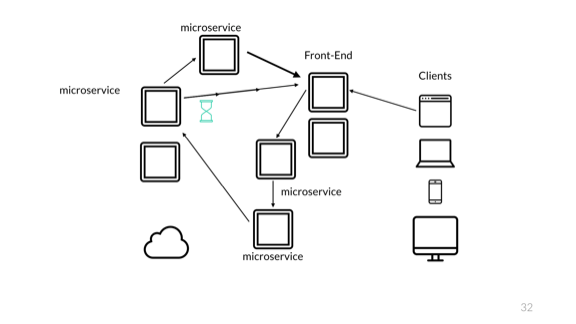
Oh but there's more. Time is always bad news. When we work with systems like that, we may get entirely different logical endings.
Here in this case, the customer may send a request, which makes it to the first service, then to a second one, and then to a third one. Let's say this service confirms that an item was bought. It sends a notification of this to the front-end.
After having sent that notification, the service instantly sends the order to a fourth service, which sets up say, a confirmation of shipping or something of that kind. That fourth service also sends a notification to the front-end.
What can happen here, through the magic of network delays, is that the front-end is made aware that shipping is taking place before the purchase is even confirmed.
This is tricky because you have, if you're the front-end developer that is, to be aware and able to foresee these things and deal with them properly. If the same events go to some audit system instead, it could very well consider it a bug, ring an alarm, cancel the shipment, and so on. Who knows what horrors may happen.
The need for this then is to consider logical time to track causality, rather than having it implicit, but that's too big to cover here.
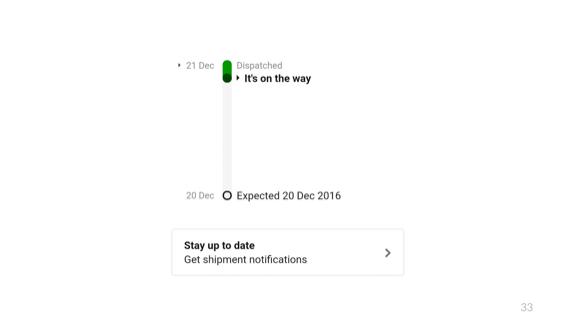
But these kinds of logical errors are fun, and can let us do time travel.
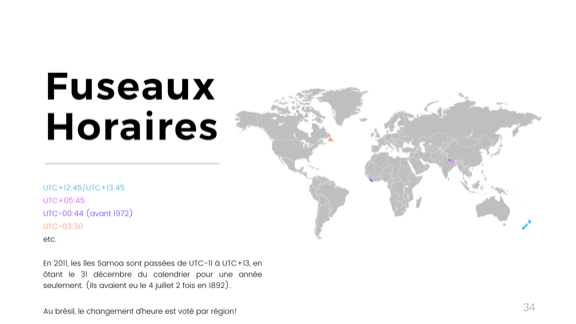
But that's not the end of it with time. People here are generally aware of time zones. But who here is aware of the time zones on the half hour?
(most people raise their hands)
That's good, since Newfoundland has exactly that. That's within the country so it's good that you know.
But then again, who's aware that we have them on the quarter hour? New Zealand's got that. Or that Liberia once had it on the 44th minute of the hour? Maybe some here are aware that in 1927, China went back 5 minutes and a few seconds on their time zones!
But there's more. Changes in time zones aren't always minor. The Samoa Islands, for example, switched back and forth between UTC-11 and UTC+13, switching days entirely. The trick is that they're on the date change line. In 1892, the Samoa Islands decided to align their calendars with the US for market reasons, and had the 4th of July twice that year. First of July, second of July, third of July, fourth of July, fourth of July, fifth of July, ...
Then again in 2011 (that's not that long ago!) they aligned with China, and in the Samoa islands only, there was no December 31 that year.
Then there's daylight saving times. If you know Brazillian sysadmins, you may have heard of that fun fact that (and I don't know if they still do that) each region/province/state in Brazil would vote whether they would adhere to DST every year, every time. No way to know ahead of time, but you had to update them time zone files.

Then you've got leap seconds. With time zone issues, the trick is often to just use UTC. But this has nice effects since everyone kind of still uses unix timestamps underneath and freely converts between UTC and the epoch starting at Jan 1st 1970.
That's because UTC accounts for leap seconds, which are frequent adjustments added or removed based on earth's orbit and rotation to keep the clocks in sync with the real world. Since 1970, we're at a net 27 seconds offset. The unix epoch on our systems does not account for them.
The image right here on the slide is from a bug in the iPhone a couple of years ago, where if you would rewind the date on the phone to January 1st 1970, you would brick your phone. It would see all software as invalid and refuse to recognize anything. Fully bricked, no way to repair or reset.
My personal guess as to why this happened (and I very much wish I'm right) has to do with this discrepancy in time representations. If you use an unsigned integer—those pesky integers again—and use them to represent the time starting at Jan 1st 1970 as an epoch, but use a UTC conversion to set the date and time, you end up at -27, which is not representable as an unsigned integer, and we instead underflow. This gives us the year 2106 over 32 bits, which may be too late for any software validation and things just break.
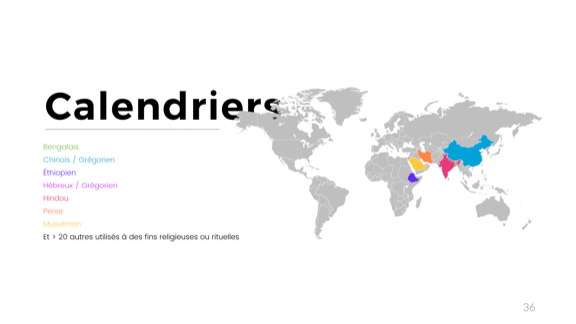
But there's more. Oh so much more. Here in Quebec and North America we use the Gregorian time. Who here has made mistakes related to leap years in their code? (a bunch of people raise their hands)
This is not much. There's a lot of calendars in use out there, on a legal status. Even more for purely cultural uses:
  • there's the Bengali calendar, which is solar and based on 6 seasons of two months;
  • the Chinese calendar, which is a fairly confusing lunisolar calendar, used legally along with the Gregorian calendar in China. That's over a billion people right there
  • the Ethiopian calendar which is pretty cool and indirectly derives from the old Egyptian calendar, the first solar calendar we have on file. Its leap days are technically not part of any month. What's neater is that in Ethiopia, their midnight starts at what is 6AM in neighbouring countries. Since Ethiopia has made it a point of pride that they have never been colonized, they are generally not interested in adopting other systems.
  • The Hebrew calendar is one of the oldest calendars on file, is both lunar and solar, and has some of the most complex rules I've seen related to choice of dates. Just picking the first day of the year has what is probably a few full pages of business rules. It's usable legally in Israel, with the same status as the Gregorian calendar.
  • There's a Hindu calendar, also very complex to me, using both solar and lunar cycles. What's fun is that depending on the region, the new moon or the full moon is used as a cycle beginning so the same calendar gives two varying sets of dates within the same country. But with India in the mix, we're close to a third of the world population pretty frequently dealing with non-Gregorian calendars
  • Then there's a Persian one, whose details I don't really remember all that well at the moment
  • And there's the Islamic calendar, which is still use in Saudi Arabia for official purposes, but also in other countries for cultural or religious purposes. What's interesting about it is that it's an observational calendar, meaning that every new lunar cycle, some authority figure has to get out, look at the moon, and say "this is a new moon, we officially have a new month". In the past, when more countries used it, it was possible to get a bunch of months starting on different dates for people all using the same calendars, since observations would vary according to locations.
So uh yeah. Lots to keep in mind here. Let's leave all that complex time stuff behind for something different.

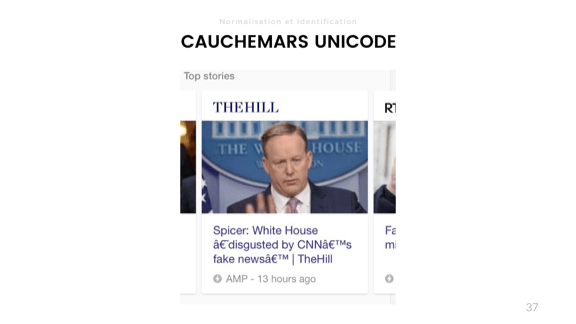
Oh no. Unicode. I assume a lot of people here have had their own names mangled by various systems given all the French accents. Show of hands? (over half the room raise their hands)
Yeah. So you know how that goes. The problem for that one is a conflict in encoding between Latin-1 (or ISO-8859-1) and UTF-8.
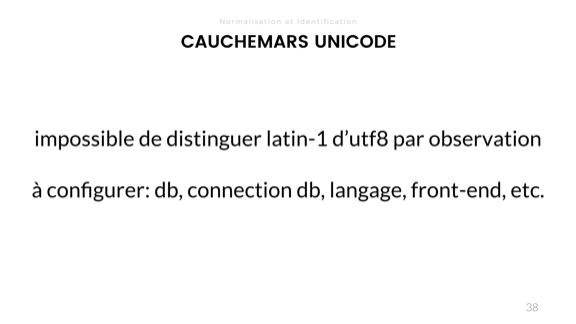
The gotcha here is that in the lower characters, UTF-8 and ISO-8859-1 are absolutely the same, with the lowest characters shared with ASCII.
So we have to configure every step of the way to have the same encoding. This starts at the client, but then the data transfer with HTTP (including the pesky meta tags), the instances themselves if anything comes from there, then the programming languages used (some functions are not inherently UTF-8 everywhere), then the connection to the database (since SQL is text-based, it is encoding-sensitive), and then the database itself. If you're lucky, your DB also lets you set a configuration per table, and per-column.
Any of them being wrong and it becomes impossible to figure out what went wrong; you flat out corrupted your data and human intervention will be required to make sense out of it.
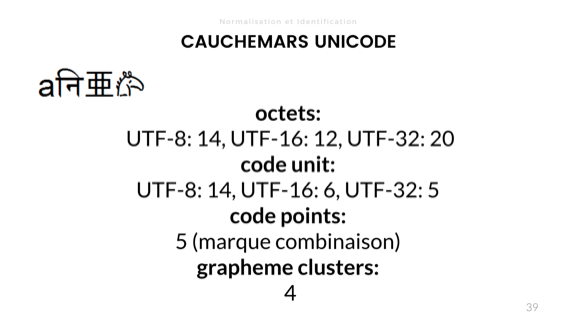
Length is also variable in Unicode. There' 4 ways to account for it. Using that funky little string with the 'a' and the horse in it:
  • There's byte length, which gives us 14 bytes in UTF-8, 12 in UTF-16, and 20 bytes in UTF-32
  • There's a length in code unit, which is about how many bit combinations are used for each encoding for the string, here being 14, 6, and 5 in this case, for UTF-8, UTF-16, and UTF-32 respectively
  • There's the code point length, which is based on the number of logical Unicode 'characters'. Here the length is 5 since the second character here is made with a combining mark giving it its cool little curve on top.
  • Then there's grapheme clusters, which are what we humans consider to be characters. I like to describe that one as "how many times you need to press the delete key until the string is empty". That's a length of 4.
The length may vary from language to language when it comes to grapheme clusters, so locale is important.
That one is fun. At a previous job, we once took down an entire cluster for 40+ minutes as a binary protocol mandated byte length over the data it shuttled, but one of the two ends of the communication used code point length to work. This went fine for years, until we started transmitting arbitrary data carried by customers. It took about 30 seconds for someone to put in data with Unicode that desynchronized both protocols and took the whole thing down.
We rolled back ASAP, but it took us about 3 days of investigating to figure it out fully. Good time to be on vacation.
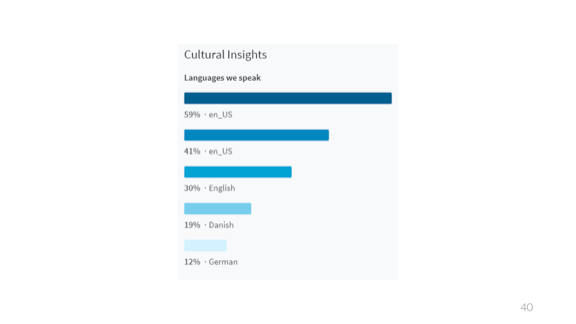
That one is a poll about languages used. Not sure how they got these results, but it seems about right to me.
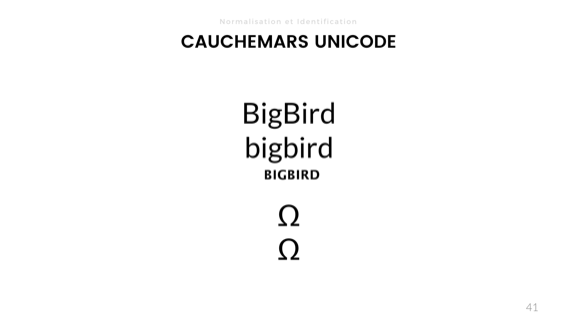
Ah that one is fun. I got this one from some fun bug Spotify had a few years ago, so instead of recounting the words I said in a talk, I'll link directly to their blog post: https://labs.spotify.com/2013/06/18/creative-usernames/
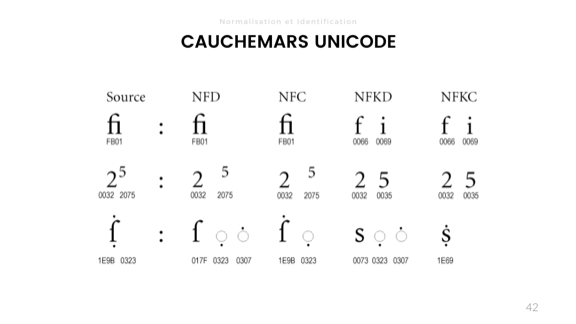
This slide explains normalization of Unicode. It was used as a support for the Unicode bug at Spotify, so here's the link to the blog post again: https://labs.spotify.com/2013/06/18/creative-usernames/
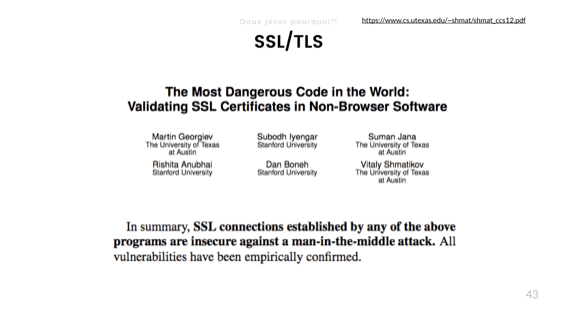
And now we get to the real fun stuff! Security! This is from a 2012 paper called The most dangerous code in the world: validating SSL certificates in non-browser software which I encourage you to read.
When it comes to bad abstractions, security takes the cake. What they found is that pretty much all the software they looked at that had to validate certificates, outside of web browsers, would do it wrong in critical ways that would allow Man-in-the-middle attacks, where someone can intercept, peek at, modify, or hijack the entire session. Fun times.
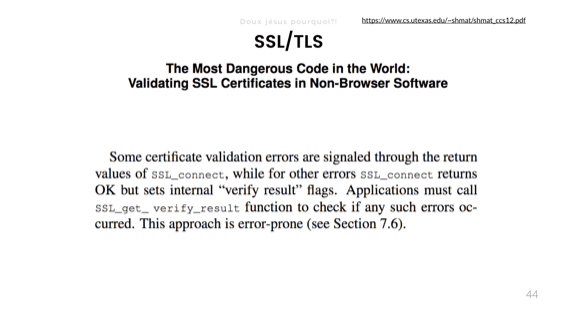
Here's a good snippet from the OpenSSL library, with such a bad interface a bunch of people missed critical bits of validation.
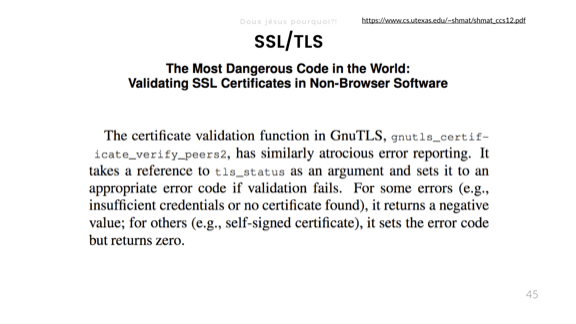
And here's one about GnuTLS, with a "similarly atrocious" interface.
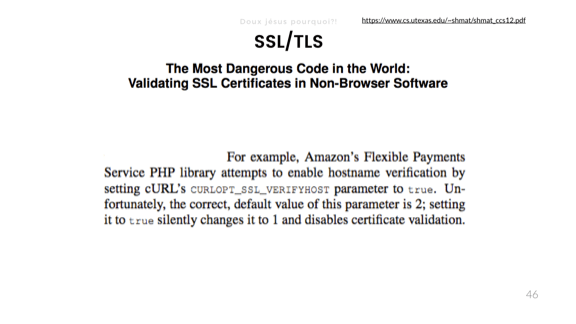
But my favorite has to be the cURL API in PHP. By default, settings are fine and correct, but if you read the doc, you may want to set the CURLOPT_SSL_VERIFYHOST option to true. The problem is that in PHP (much as in C and C++), true is pretty much the same as 1. Yet, the value 1 for CURLOPT_SSL_VERIFYHOST actually disables validation. The correct value is 2.
Whoops.

This brings me to the concept of class breaks, which I've first heard described by Bruce Schneier on his blog.
The idea is that a lot of real world physical systems are weak and easy to break. The locks on our doors are like that. There's multiple ways to lockpick or bump your way into a home, but every attack has to be repeated independently.
In the case of software, you have the concept of a class break, where the moment you find a vulnerability, there is potential for it to be used to exploit everyone at once. This is relatively new and particularly scary.
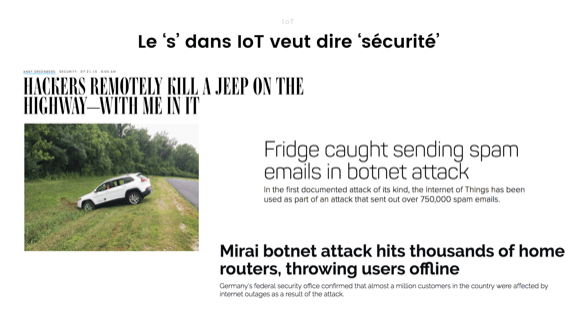
The Internet of Things, hailed as fairly amazing in this here conference, is particularly worrisome. Implementations are just bad. the more code you work on, the less you trust IoT developers are doing a good job.
There's been fun examples, ranging from hacking cars and driving them into ditches (was that dongle your insurance company wants you to use to lower your premiums something car constructors were ready to connect over a network?), fridges sending spam, devices getting involved into botnets that take infrastructure down, and so on.

So that's where it leads us. We had what was seemingly a very straightforward application, but riddled with potential bugs we have nearly no way to guess could even exist. Yet these sharp edges are embedded at every level of the system. As a developer, what's our responsibility? Do we have to answer for things we don't even imagine could be there?
The building code was put in place probably because too many people were being crushed by their houses collapsing on them. Relatively few people have died from bad code at this point in time, but software sure is eating the world. The code we write makes it out there and can stay for very long periods of time, far longer than we'd all hope it lasts every time we add in some quick fix.
Do we take adequate means to make sure what we publish is safe? Are we allowed to freewheel the way we do just because we haven't killed enough people yet? Are we collectively aware of the problem but just shedding our personal responsibility until something big forces us as a whole to do better?
I don't know for sure, but all of that stuff is very scary, and I just hope I'm not one of those that will end up causing enough grief to require laws to be put in place. Maybe all of us should fear that a bit. Everything's terrible, and we've got a part of blame in this.

poniedziałek, 17 października 2016

IDisposable, minimal and standard implementation

  1. Minimal implementation (for managed resources only).
  2. Standard Implementation.
    https://msdn.microsoft.com/en-us/library/system.idisposable.dispose%28v=vs.110%29.aspx

    using System;
    using System.ComponentModel;
    
    // The following example demonstrates how to create
    // a resource class that implements the IDisposable interface
    // and the IDisposable.Dispose method.
    
    public class DisposeExample
    {
        // A base class that implements IDisposable.
        // By implementing IDisposable, you are announcing that
        // instances of this type allocate scarce resources.
        public class MyResource: IDisposable
        {
            // Pointer to an external unmanaged resource.
            private IntPtr handle;
            // Other managed resource this class uses.
            private Component component = new Component();
            // Track whether Dispose has been called.
            private bool disposed = false;
    
            // The class constructor.
            public MyResource(IntPtr handle)
            {
                this.handle = handle;
            }
    
            // Implement IDisposable.
            // Do not make this method virtual.
            // A derived class should not be able to override this method.
            public void Dispose()
            {
                Dispose(true);
                // This object will be cleaned up by the Dispose method.
                // Therefore, you should call GC.SupressFinalize to
                // take this object off the finalization queue
                // and prevent finalization code for this object
                // from executing a second time.
                GC.SuppressFinalize(this);
            }
    
            // Dispose(bool disposing) executes in two distinct scenarios.
            // If disposing equals true, the method has been called directly
            // or indirectly by a user's code. Managed and unmanaged resources
            // can be disposed.
            // If disposing equals false, the method has been called by the
            // runtime from inside the finalizer and you should not reference
            // other objects. Only unmanaged resources can be disposed.
            protected virtual void Dispose(bool disposing)
            {
                // Check to see if Dispose has already been called.
                if(!this.disposed)
                {
                    // If disposing equals true, dispose all managed
                    // and unmanaged resources.
                    if(disposing)
                    {
                        // Dispose managed resources.
                        component.Dispose();
                    }
    
                    // Call the appropriate methods to clean up
                    // unmanaged resources here.
                    // If disposing is false,
                    // only the following code is executed.
                    CloseHandle(handle);
                    handle = IntPtr.Zero;
    
                    // Note disposing has been done.
                    disposed = true;
    
                }
            }
    
            // Use interop to call the method necessary
            // to clean up the unmanaged resource.
            [System.Runtime.InteropServices.DllImport("Kernel32")]
            private extern static Boolean CloseHandle(IntPtr handle);
    
            // Use C# destructor syntax for finalization code.
            // This destructor will run only if the Dispose method
            // does not get called.
            // It gives your base class the opportunity to finalize.
            // Do not provide destructors in types derived from this class.
            ~MyResource()
            {
                // Do not re-create Dispose clean-up code here.
                // Calling Dispose(false) is optimal in terms of
                // readability and maintainability.
                Dispose(false);
            }
        }
        public static void Main()
        {
            // Insert code here to create
            // and use the MyResource object.
        }
    }

środa, 6 stycznia 2016

środa, 18 lutego 2015

What is performance cost of object oriented iterator in c++


  1. Introduction

    In this article I would like to present performance difference between object-oriented iterators (runtime polymorphism) and generic iterators (compile-time polymorphism).
    All standard library iterators (stl) are implemented according to generic programming principles. Because in generic programming everything must be known during compilation, this technique has some limitations. It increases necessity of code recompilation and prevents from providing independent library.
    For example you cannot have library (in terms of shared library like "so" or "dll") which has exported standard algorithm like accumulate, you could do it only for known in advance iterator types (value types and containers).

    Fortunately, we can probably "do better" with object-oriented and type erasure approach. Thanks to runtime polymorphism it's possible to implement such iterator, which depends only on it's value type but not on underplaying container type.
    Thomas Becker wrote great article about such object-oriented iterator with type erasure (http://www.artima.com/cppsource/type_erasure.html). This article is based on his implementation called "any_iterator".
    Object-oriented iterator is good step forward, but still depends on it's value type, so it makes a difference if function takes any_iterator<int> or any_iterator<double>. Because of that, if we want to expose algorithm like accumulate in shared library, we would need to provide declarations for all possible value types.
  2. Performance issues

    Lack of flexibility is not the only disadvantage of object-oriented iterators. Another problem is performance cost of runtime polymorphism. How significant it might be ? Two times slower, maybe five times slower?

    Well, if we talk about performance, intuition will be probably wrong,  so let's measure it!
    I've prepared a c++11 program which is testing performance of accumulate algorithm on vector<int> and list<int> containers, using standard generic iterators and runtime polymorphic any_iterator.
    Surprisingly performance cost of object oriented approach is extraordinary, for list it is 40 and for vector it is 70 times slower!

    Such extraordinary performance degradation shows what is the real cost of runtime polymorphism. It's not only one virtual method call, which after all shouldn't be so costly. The main cost is in preventing compiler from performing any optimisation (inlining, vectorisation, etc...).
  3. Test results

  • Compilation flags

    clang++ -c -pipe -O2 -std=c++11 -Wall -W -fPIE
  • Results

    Filling list, elapsed: 7439ms
    Filling vector, elapsed: 1936ms
    Accumulate list:144118291114003667, elapsed: 1150ms
    Accumulate vector:144118291114003667, elapsed: 176ms
    Accumulate list any_iterator:144118291114003667, elapsed: 44447ms
    Accumulate vector any_iterator:144118291114003667, elapsed: 12226ms
    Accumulate vector backwards:144118291114003667, elapsed: 217ms
    Accumulate vector backwards any_iterator:144118291114003667, e..: 12773ms
  • Source code

    #include <iostream>
    #include <list>
    #include <vector>
    #include <algorithm>
    #include <chrono>
    #include <sstream>
    
    #include <any_iterator/any_iterator.hpp>
    
    using namespace std;
    
    typedef IteratorTypeErasure::any_iterator<
      int const, // Value
      boost::bidirectional_traversal_tag,
      int const // Reference
    >
    any_number_iterator;
    
    const size_t MAX_NUMBERS = 1<<27;
    
    int main()
    {
        list<int> l;
        vector<int> v;
        vector<pair<string, chrono::nanoseconds>> results;
    
        // fill list
        {
            auto start = chrono::high_resolution_clock::now();
            srand(0);generate_n(back_inserter(l), MAX_NUMBERS, rand);
            auto end = chrono::high_resolution_clock::now();
            results.push_back(make_pair("Filling list", end-start));
        }
    
        // fill vector
        {
            auto start = chrono::high_resolution_clock::now();
            srand(0);generate_n(back_inserter(v), MAX_NUMBERS, rand);
            auto end = chrono::high_resolution_clock::now();
            results.push_back(make_pair("Filling vector", end-start));
        }
    
        // accumulate list
        {
            auto start = chrono::high_resolution_clock::now();
            auto result = accumulate (l.begin(), l.end(), 0L);
            auto end = chrono::high_resolution_clock::now();
            stringstream ss;ss<<"Accumulate list:"<<result;
            results.push_back(make_pair(ss.str(), end-start));
        }
    
        // accumulate vector
        {
            auto start = chrono::high_resolution_clock::now();
            auto result = accumulate (v.begin(), v.end(), 0L);
            auto end = chrono::high_resolution_clock::now();
            stringstream ss;ss<<"Accumulate vector:"<<result;
            results.push_back(make_pair(ss.str(), end-start));
        }
    
        // accumulate list any_iterator
        {
            auto start = chrono::high_resolution_clock::now();
            auto result = accumulate (any_number_iterator(l.begin()), any_number_iterator(l.end()), 0L);
            auto end = chrono::high_resolution_clock::now();
            stringstream ss;ss<<"Accumulate list any_iterator:"<<result;
            results.push_back(make_pair(ss.str(), end-start));
        }
    
        // accumulate vector any_iterator
        {
            auto start = chrono::high_resolution_clock::now();
            auto result = accumulate (any_number_iterator(v.begin()), any_number_iterator(v.end()), 0L);
            auto end = chrono::high_resolution_clock::now();
            stringstream ss;ss<<"Accumulate vector any_iterator:"<<result;
            results.push_back(make_pair(ss.str(), end-start));
        }
    
        // accumulate vector backwards
        {
            auto start = chrono::high_resolution_clock::now();
            auto result = accumulate (v.rbegin(), v.rend(), 0L);
            auto end = chrono::high_resolution_clock::now();
            stringstream ss;ss<<"Accumulate vector backwards:"<<result;
            results.push_back(make_pair(ss.str(), end-start));
        }
    
        // accumulate vector backwards any_iterator
        {
            auto start = chrono::high_resolution_clock::now();
            auto result = accumulate (any_number_iterator(v.rbegin()), any_number_iterator(v.rend()), 0L);
            auto end = chrono::high_resolution_clock::now();
            stringstream ss;ss<<"Accumulate vector backwards any_iterator:"<<result;
            results.push_back(make_pair(ss.str(), end-start));
        }
    
        for (const auto &i:results)
            cout << i.first<<", elapsed: "<<chrono::duration_cast<std::chrono::milliseconds>(i.second).count()<<"ms"<<endl;
    
        return 0;
    }
    
References:

http://www.artima.com/cppsource/type_erasure.html

czwartek, 1 stycznia 2015

Technical papers for programmers

  1. Out of the Tar Pit (by Ben Moseley and Peter Marks)
    • Accidental vs. Essential complexity
    •  "We have argued that complexity causes more problems in large software
      systems than anything else. We have also argued that it can be tamed
      — but only through a concerted effort to avoid it where possible, and to
      separate it where not. Specifically we have argued that a system can usefully
      be separated into three main parts: the essential state, the essential logic,
      and the accidental state and control." 
  2. Dynamo: Amazon’s Highly Available Key-value Store(by Giuseppe DeCandia, Deniz Hastorun, Madan Jampani, Gunavardhan Kakulapati, Avinash Lakshman, Alex Pilchin, Swaminathan Sivasubramanian, Peter Vosshall and Werner Vogels)
  3. Time, Clocks, and the Ordering of Events in a Distributed System (by Leslie Lamport (1978))
  4. Anchoring and Adjustment in Software Estimation. (By Jorg Aranda,  Steve Easterbrook).
    • Although the patterns on each condition are visible on the chart,
      the following numbers help to clarify it. The “2 months”
      participants had a mean estimate of 6.8 months. 
    • The control condition has a slightly higher mean estimate, at 8.3 months
    • and the “20 months” condition’s mean estimate is 17.4 months.
       
  5.  State the Problem Before Describing the Solution (By Leslie Lamport)
    .
    • a brief informal statement of the problem
    • the precise correctness conditions required of solution (this is the most important point that allows verify that we solve the right problem)
    • the solution
    • a proof that the solution satisfies the requisite condition
     

wtorek, 27 maja 2014

A Hacker’s Guide to Git (by Joseph)

http://wildlyinaccurate.com/a-hackers-guide-to-git

A Hacker’s Guide to Git

This post is a work in progress. Please feel free to contact me with any corrections, requests or suggestions.

Introduction

Git is currently the most widely used version control system in the world, mostly thanks to GitHub. By that measure, I’d argue that it’s also the most misunderstood version control system in the world.
This statement probably doesn’t ring true straight away because on the surface, Git is pretty simple. It’s really easy to pick up if you’ve come from another VCS like Subversion or Mercurial. It’s even relatively easy to pick up if you’ve never used a VCS before. Everybody understands adding, committing, pushing and pulling; but this is about as far as Git’s simplicity goes. Past this point, Git is shrouded by fear, uncertainty and doubt.
Once you start talking about branching, merging, rebasing, multiple remotes, remote-tracking branches, detached HEAD states… Git becomes less of an easily-understood tool and more of a feared deity. Anybody who talks about no-fast-forward merges is regarded with quiet superstition, and even veteran hackers would rather stay away from rebasing “just to be safe”.
I think a big part of this is due to many people coming to Git from a conceptually simpler VCS — probably Subversion — and trying to apply their past knowledge to Git. It’s easy to understand why people want to do this. Take Subversion, for example. Subversion is simple, right? It’s just files and folders. Commits are numbered sequentially. Even branching and tagging is simple — it’s just like taking a backup of a folder.
Basically, Subversion fits in nicely with our existing computing paradigms. Everybody understands files and folders. Everybody knows that revision #10 was the one after #9 and before #11. But these paradigms break down when you try to apply them to Git’s advanced features.
That’s why trying to understand Git in this way is wrong. Git doesn’t work like Subversion at all. Which is pretty confusing, right? You can add and remove files. You can commit your changes. You can generate diffs and patches which look just like Subversion’s. How can something which appears so similar really be so different?
Complex systems like Git become much easier to understand once you figure out how they really work. The goal of this post is to shed some light on how Git works under the hood. We’re going to take a look at some of Git’s core concepts including its basic object storage, how commits work, how branches and tags work, and we’ll look at the different kinds of merging in Git including the much-feared rebase. Hopefully at the end of it all, you’ll have a solid understanding of these concepts and will be able to use some of Git’s more advanced features with confidence.
It’s worth noting at this point that this guide is not intended to be a beginner’s introduction to Git. This guide was written for people who already use Git, but would like to better understand it by taking a peek under the hood, and learn a few neat tricks along the way. With that said, let’s begin.

Repositories

At the core of Git, like other VCS, is the repository. A Git repository is really just a simple key-value data store. This is where Git stores, among other things:
  • Blobs, which are the most basic data type in Git. Essentially, a blob is just a bunch of bytes; usually a binary representation of a file.
  • Tree objects, which are a bit like directories. Tree objects can contain pointers to blobs and other tree objects.
  • Commit objects, which point to a single tree object, and contain some metadata including the commit author and any parent commits.
  • Tag objects, which point to a single commit object, and contain some metadata.
  • References, which are pointers to a single object (usually a commit or tag object).
You don’t need to worry about all of this just yet; we’ll cover these things in more detail later.
The important thing to remember about a Git repository is that it exists entirely in a single .git directory in your project root. There is no central repository like in Subversion or CVS. This is what allows Git to be a distributed version control system — everybody has their own self-contained version of a repository.
You can initialize a Git repository anywhere with the git init command. Take a look inside the .git folder to get a glimpse of what a repository looks like.
$ git init
Initialized empty Git repository in /home/demo/demo-repository/.git/
$ ls -l .git
total 32
drwxrwxr-x 2 demo demo 4096 May 24 20:10 branches
-rw-rw-r-- 1 demo demo 92 May 24 20:10 config
-rw-rw-r-- 1 demo demo 73 May 24 20:10 description
-rw-rw-r-- 1 demo demo 23 May 24 20:10 HEAD
drwxrwxr-x 2 demo demo 4096 May 24 20:10 hooks
drwxrwxr-x 2 demo demo 4096 May 24 20:10 info
drwxrwxr-x 4 demo demo 4096 May 24 20:10 objects
drwxrwxr-x 4 demo demo 4096 May 24 20:10 refs
The important directories are .git/objects, where Git stores all of its objects; and .git/refs, where Git stores all of its references.
We’ll see how all of this fits together as we learn about the rest of Git. For now, let’s learn a little bit more about tree objects.

Tree Objects

A tree object in Git can be thought of as a directory. It contains a list of blobs (files) and other tree objects (sub-directories).
Imagine we had a simple repository, with a README file and a src/ directory containing a hello.c file.
README
src/
    hello.c
This would be represented by two tree objects: one for the root directory, and another for the src/ directory. Here’s what they would look like.
tree 4da454..
blob 976165.. README
tree 81fc8b.. src
tree 81fc8b..
blob 1febef.. hello.c
If we draw the blobs (in green) as well as the tree objects (in blue), we end up with a diagram that looks a lot like our directory structure.
Git tree graph
Notice how given the root tree object, we can recurse through every tree object to figure out the state of the entire working tree. The root tree object, therefore, is essentially a snapshot of your repository at a given time. Usually when Git refers to “the tree”, it is referring to the root tree object.
Now let’s learn how you can track the history of your repository with commit objects.

Commits

A commit object is essentially a pointer that contains a few pieces of important metadata. The commit itself has a hash, which is built from a combination of the metadata that it contains:
  • The hash of the tree (the root tree object) at the time of the commit. As we learned in Tree Objects, this means that with a single commit, Git can build the entire working tree by recursing into the tree.
  • The hash of any parent commits. This is what gives a repository its history: every commit has a parent commit, all the way back to the very first commit.
  • The author’s name and email address, and the time that the changes were authored.
  • The committer’s name and email address, and the time that the commit was made.
  • The commit message.
Let’s see a commit object in action by creating a simple repository.
 $ git init
Initialized empty Git repository in /home/demo/simple-repository/.git/
 $ echo 'This is the readme.' > README
 $ git add README
 $ git commit -m "First commit"
[master (root-commit) d409ca7] First commit
 1 file changed, 1 insertion(+)
 create mode 100644 README
When you create a commit, Git will give you the hash of that commit. Using git show with the --format=raw flag, we can see this newly-created commit’s metadata.
$ git show --format=raw d409ca7

commit d409ca76bc919d9ca797f39ae724b7c65700fd27
tree 9d073fcdfaf07a39631ef94bcb3b8268bc2106b1
author Joseph Wynn <joseph@wildlyianccurate.com> 1400976134 -0400
committer Joseph Wynn <joseph@wildlyianccurate.com> 1400976134 -0400

    First commit

diff --git a/README b/README
new file mode 100644
index 0000000..9761654
--- /dev/null
+++ b/README
@@ -0,0 +1 @@
+This is the readme.
Notice how although we referenced the commit by the partial hash d409ca7, Git was able to figure out that we actually meant d409ca76bc919d9ca797f39ae724b7c65700fd27. This is because the hashes that Git assigns to objects are unique enough to be identified by the first few characters. You can see here that Git is able to find this commit with as few as four characters; after which point Git will tell you that the reference is ambiguous.
$ git show d409c
$ git show d409
$ git show d40
fatal: ambiguous argument 'd40': unknown revision or path not in the working tree.

References

In previous sections, we saw how objects in Git are identified by a hash. Since we want to manipulate objects quite often in Git, it’s important to know their hashes. You could run all your Git commands referencing each object’s hash, like git show d409ca7, but that would require you to remember the hash of every object you want to manipulate.
To save you from having to memorize these hashes, Git has references, or “refs”. A reference is simply a file stored somewhere in .git/refs, containing the hash of a commit object.
To carry on the example from Commits, let’s figure out the hash of “First commit” using references only.
$ git status
On branch master
nothing to commit, working directory clean
git status has told us that we are on branch master. As we will learn in a later section, branches are just references. We can see this by looking in .git/refs/heads.
$ ls -l .git/refs/heads/
total 4
-rw-rw-r-- 1 demo demo 41 May 24 20:02 master
We can easily see which commit master points to by reading the file.
$ cat .git/refs/heads/master
d409ca76bc919d9ca797f39ae724b7c65700fd27
Sure enough, master contains the hash of the “First commit” object.
Of course, it’s possible to simplify this process. Git can tell us which commit a reference is pointing to with the show and rev-parse commands.
$ git show --oneline master
d409ca7 First commit
$ git rev-parse master
d409ca76bc919d9ca797f39ae724b7c65700fd27
Git also has a special reference, HEAD. This is a “symbolic” reference which points to the tip of the current branch rather than an actual commit. If we inspect HEAD, we see that it simply points to refs/head/master.
$ cat .git/HEAD
ref: refs/heads/master
It is actually possible for HEAD to point directly to a commit object. When this happens, Git will tell you that you are in a “detached HEAD state”. We’ll talk a bit more about this later, but really all this means is that you’re not currently on a branch.

Branches

Git’s branches are often touted as being one of its strongest features. This is because branches in Git are very lightweight, compared to other VCS where a branch is usually a clone of the entire repository.
The reason branches are so lightweight in Git is because they’re just references. We saw in References that the master branch was simply a file inside .git/refs/heads. Let’s create another branch to see what happens under the hood.
$ git branch test-branch
$ cat .git/refs/heads/test-branch 
d409ca76bc919d9ca797f39ae724b7c65700fd27
It’s as simple as that. Git has created a new entry in .git/refs/heads and pointed it at the current commit.
We also saw in References that HEAD is Git’s reference to the current branch. Let’s see that in action by switching to our newly-created branch.
$ cat .git/HEAD
ref: refs/heads/master
$ git checkout test-branch 
Switched to branch 'test-branch'
$ cat .git/HEAD
ref: refs/heads/test-branch
When you create a new commit, Git simply changes the current branch to point to the newly-created commit object.
$ echo 'Some more information here.' >> README
$ git add README
$ git commit -m "Update README in a new branch"
[test-branch 7604067] Update README in a new branch
 1 file changed, 1 insertion(+)
$ cat .git/refs/heads/test-branch 
76040677d717fd090e327681064ac6af9f0083fb
Later on we’ll look at the difference between local branches and remote-tracking branches.

Tags

There are two types of tags in Git – lightweight tags and annotated tags.
On the surface, these two types of tags look very similar. Both of them are references stored in .git/refs/tags. However, that’s about as far as the similarities go. Let’s create a lightweight tag to see how they work.
$ git tag 1.0-lightweight
$ cat .git/refs/tags/1.0-lightweight 
d409ca76bc919d9ca797f39ae724b7c65700fd27
We can see that Git has created a tag reference which points to the current commit. By default, git tag will create a lightweight tag. Note that this is not a tag object. We can verify this by using git cat-file to inspect the tag.
$ git cat-file -p 1.0-lightweight
tree 9d073fcdfaf07a39631ef94bcb3b8268bc2106b1
author Joseph Wynn <joseph@wildlyianccurate.com> 1400976134 -0400
committer Joseph Wynn <joseph@wildlyianccurate.com> 1400976134 -0400

First commit
$ git cat-file -p d409ca7
tree 9d073fcdfaf07a39631ef94bcb3b8268bc2106b1
author Joseph Wynn <joseph@wildlyianccurate.com> 1400976134 -0400
committer Joseph Wynn <joseph@wildlyianccurate.com> 1400976134 -0400

First commit
You can see that as far as Git is concerned, the 1.0-lightweight tag and the d409ca7 commit are the same object. That’s because the lightweight tag is only a reference to the commit object.
Let’s compare this to an annotated tag.
$ git tag -a -m "Tagged 1.0" 1.0
$ cat .git/refs/tags/1.0
10589beae63c6e111e99a0cd631c28479e2d11bf
We’ve passed the -a (--annotate) flag to git tag to create an annotated tag. Notice how Git creates a reference for the tag just like the lightweight tag, but this reference is not pointing to the same object as the lightweight tag. Let’s use git cat-file again to inspect the object.
$ git cat-file -p 1.0
object d409ca76bc919d9ca797f39ae724b7c65700fd27
type commit
tag 1.0
tagger Joseph Wynn <joseph@wildlyianccurate.com> 1401029229 -0400

Tagged 1.0
This is a tag object, separate to the commit that it points to. As well as containing a pointer to a commit, tag objects also store a tag message and information about the tagger. Tag objects can also be signed with a GPG key to prevent commit or email spoofing.
Aside from being GPG-signable, there are a few reasons why annotated tags are preferred over lightweight tags.
Probably the most important reason is that annotated tags have their own author information. This can be helpful when you want to know who created the tag, rather than who created the commit that the tag is referring to.
Annotated tags are also timestamped. Since new versions are usually tagged right before they are released, an annotated tag can tell you when a version was released rather than just when the final commit was made.

Merging

Merging in Git is the process of joining two histories (usually branches) together. Let’s start with a simple example. Say you’ve created a new feature branch from master, and done some work on it.
$ git checkout -b feature-branch
Switched to a new branch 'feature-branch'
$ vim feature.html
$ git commit -am "Finished the new feature"
[feature-branch 0c21359] Finished the new feature
 1 file changed, 1 insertion(+)
At the same time, you need to fix an urgent bug. So you create a hotfix branch from master, and do some work in there.
$ git checkout master
Switched to branch 'master'
$ git checkout -b hotfix
Switched to a new branch 'hotfix'
$ vim index.html
$ git commit -am "Fixed some wording"
[hotfix 40837f1] Fixed some wording
 1 file changed, 1 insertion(+), 1 deletion(-)
At this point, the history will look something like this.
Branching -- hotfix and feature branch
Now you want to bring the bug fix into master so that you can tag it and release it.
$ git checkout master
Switched to branch 'master'
$ git merge hotfix
Updating d939a3a..40837f1
Fast-forward
 index.html | 2 +-
 1 file changed, 1 insertion(+), 1 deletion(-)
Notice how Git mentions fast-forward during the merge. What this means is that all of the commits in hotfix were directly upstream from master. This allows Git to simply move the master pointer up the tree to hotfix. What you end up with looks like this.
Branching -- after merging hotfix
Now let’s try and merge feature-branch into master.
$ git merge feature-branch 
Merge made by the 'recursive' strategy.
 feature.html | 1 +
 1 file changed, 1 insertion(+)
This time, Git wasn’t able to perform a fast-forward. This is because feature-branch isn’t directly upstream from master. This is clear on the graph above, where master is at commit D which is in a different history tree to feature-branch at commit C.
So how did Git handle this merge? Taking a look at the log, we see that Git has actually created a new “merge” commit, as well as bringing the commit from feature-branch.
$ git log --oneline
8ad0923 Merge branch 'feature-branch'
0c21359 Finished the new feature
40837f1 Fixed some wording
d939a3a Initial commit
Upon closer inspection, we can see that this is a special kind of commit object — it has two parent commits. This is referred to as a merge commit.
$ git show --format=raw 8ad0923

commit 8ad09238b0dff99e8a99c84d68161ebeebbfc714
tree e5ee97c8f9a4173f07aa4c46cb7f26b7a9ff7a17
parent 40837f14b8122ac6b37c0919743b1fd429b3bbab
parent 0c21359730915c7888c6144aa8e9063345330f1f
author Joseph Wynn <joseph@wildlyinaccurate.com> 1401134489 +0100
committer Joseph Wynn <joseph@wildlyinaccurate.com> 1401134489 +0100

 Merge branch 'feature-branch'
This means that our history graph now looks something like this (commit E is the new merge commit).
Branching -- after merging feature-branch
Some people believe that this sort of history graph is undesirable. In the Rebasing (Continued) section, we’ll learn how to prevent non-fast-forward merges by rebasing feature branches before merging them with master.

Rebasing

Rebasing is without a doubt one of Git’s most misunderstood features. For most people, git rebase is a command that should be avoided at all costs. This is probably due to the extraordinary amount of scaremongering around rebasing. “Rebase Considered Harmful”, and “Please, stay away from rebase” are just two of the many anti-rebase articles you will find in the vast archives of the Internet.
But rebase isn’t scary, or dangerous, so long as you understand what it does. But before we get into rebasing, I’m going to take a quick digression, because it’s actually much easier to explain rebasing in the context of cherry-picking.

Cherry-Picking

What git cherry-pick does is take one or more commits, and replay them on top of the current commit. Imagine a repository with the following history graph.
Node graph -- before cherry-pick
If you are on commit D and you run git cherry-pick F, Git will take the changes that were introduced in commit F and replay them as a new commit (shown as F’) on top of commit D.
Node graph -- after cherry-pick
The reason you end up with a copy of commit F rather than commit F itself is due to the way commits are constructed. Recall that the parent commit is part of a commit’s hash. So despite containing the exact same changes, author information and timestamp; F’ will have a different parent to F, giving it a different hash.
A common workflow in Git is to develop features on small branches, and merge the features one at a time into the master branch. Let’s recreate this scenario by adding some branch labels to the graphs.
Node graph -- with branch labels
As you can see, master has been updated since foo was created. To avoid potential conflicts when foo is merged with master, we want bring master‘s changes into foo. Because master is the base branch, we want to play foo‘s commits on top of master. Essentially, we want to change commit C‘s parent from B to F.
It’s not going to be easy, but we can achieve this with git cherry-pick. First, we need to create a temporary branch at commit F.
$ git checkout master
$ git checkout -b foo-tmp
Node graph -- after creating foo-tmp
Now that we have a base on commit F, we can cherry-pick all of foo‘s commits on top if it.
$ git cherry-pick C D
Node graph -- after cherry-picking C and D
Now all that’s left to do is point foo at commit D’, and delete the temporary branch foo-tmp. We do this with the reset command, which points HEAD (and therefore the current branch) at a specified commit. The --hard flag ensures our working tree is updated as well.
$ git checkout foo
$ git reset --hard foo-tmp
$ git branch -D foo-tmp
This gives the desired result of foo‘s commits being upstream of master. Note that the original C and D commits are no longer reachable because no branch points to them.
Node graph -- after resetting foo

Rebasing (Continued)

While the example in Cherry-Picking worked, it’s not practical. In Git, rebasing allows us to replace our verbose cherry-pick workflow…
$ git checkout master
$ git checkout -b foo-tmp
$ git cherry-pick C D
$ git checkout foo
$ git reset --hard foo-bar
$ git branch -D foo-bar
…With a single command.
$ git rebase master foo
With the format git rebase <base> <target>, the rebase command will take all of the commits from <target> and play them on top of <base> one by one. It does this without actually modifying <base>, so the end result is a linear history in which <base> can be fast-forwarded to <target>.
In a sense, performing a rebase is like telling Git, “Hey, I want to pretend that <target> was actually branched from <base>. Take all of the commits from <target>, and pretend that they happened after <base>.
Let’s take a look again at the example graph from Merging to see how rebasing can prevent us from having to do a non-fast-forward merge.
Branching -- after merging hotfix
All we have to do to enable a fast-forward merge of feature-branch into master is run git rebase master feature-branch before performing the merge.
$ git rebase master feature-branch
First, rewinding head to replay your work on top of it...
Applying: Finished the new feature
This has brought feature-branch directly upstream of master.
Rebasing -- rebase feature-branch with master
Now all that’s left to do is let Git perform the merge.
$ git checkout master
$ git merge feature-branch
Updating 40837f1..2a534dd
Fast-forward
 feature.html | 1 +
 1 file changed, 1 insertion(+)

Remotes

// TODO

Pushing

// TODO

Fetching

// TODO

Pulling

// TODO

Toolkit

With a solid understanding of Git’s inner workings, some of the more advanced Git tools start to make more sense.

git-reflog

Whenever you make a change in Git that affects the tip of a branch, Git records information about that change in what’s called the reflog. Usually you shouldn’t need to look at these logs, but sometimes they can come in very handy.
Let’s say you have a repository with a few commits.
$ git log --oneline
d6f2a84 Add empty LICENSE file
51c4b49 Add some actual content to readme
3413f46 Add TODO note to readme
322c826 Add empty readme
You decide, for some reason, to perform a destructive action on your master branch.
$ git reset --hard 3413f46
HEAD is now at 3413f46 Add TODO note to readme
Since performing this action, you’ve realised that you lost some commits and you have no idea what their hashes were. You never pushed the changes; they were only in your local repository. git log is no help, since the commits are no longer reachable from HEAD.
$ git log --oneline
3413f46 Add TODO note to readme
322c826 Add empty readme
This is where git reflog can be useful.
$ git reflog
3413f46 HEAD@{0}: reset: moving to 3413f46
d6f2a84 HEAD@{1}: commit: Add empty LICENSE file
51c4b49 HEAD@{2}: commit: Add some actual content to readme
3413f46 HEAD@{3}: commit: Add TODO note to readme
322c826 HEAD@{4}: commit (initial): Add empty readme
The reflog shows a list of all changes to HEAD in reverse chronological order. The hash in the first column is the value of HEAD after the change was made. We can see, therefore, that we were at commit d6f2a84 before the destructive change.
How you want to recover commits depends on the situation. In this particular example, we can simply do a git reset --hard d6f2a84 to restore HEAD to its original position. However if we have introduced new commits since the destructive change, we may need to do something like cherry-pick all the commits that were lost.
Note that Git’s reflog is only a record of changes for your local repository. If your local repository becomes corrupt or is deleted, the reflog won’t be of any use (if the repository is deleted the reflog won’t exist at all!)
Depending on the situation, you may find git fsck more suitable for recovering lost commits.

git-fsck

In a way, Git’s object storage works like a primitive file system — objects are like files on a hard drive, and their hashes are the objects’ physical address on the disk. The Git index is exactly like the index of a file system, in that it contains references which point at an object’s physical location.
By this analogy, git fsck is aptly named after fsck (“file system check”). This tool is able to check Git’s database and verify the validity and reachability of every object that it finds.
When a reference (like a branch) is deleted from Git’s index, the object(s) they refer to usually aren’t deleted, even if they are no longer reachable by any other references. Using a simple example, we can see this in practice.
$ git checkout -b foobar
Switched to a new branch 'foobar'
$ echo 'foobar' > foo.txt 
$* git commit -am "Update foo.txt with foobar"
[foobar bcbaac7] Update foo.txt with foobar
 1 file changed, 1 insertion(+), 1 deletion(-)
$ git checkout master
Switched to branch 'master'
$ git branch -D foobar
Deleted branch foobar (was bcbaac7).
At this point, commit bcbaac7 still exists in our repository, but there are no references pointing to it. By search through the database, git fsck is able to find it.
$ git fsck --lost-found
Checking object directories: 100% (256/256), done.
dangling commit bcbaac709e0b8abbd3f1f322990d204907be5841
For simple cases, git reflog may be preferred. Where git fsck excels over git reflog, though, is when you need to find objects which you never referenced in your local repository (and therefore would not be in your reflog). An example of this is when you delete a remote branch through an interface like GitHub. Assuming the objects haven’t been garbage-collected, you can clone the remote repository and use git fsck to recover the deleted branch.

git-stash

// TODO

git-describe

Git’s describe command is summed up pretty neatly in the documentation:
git-describe – Show the most recent tag that is reachable from a commit
This can be helpful for things like build and release scripts, as well as figuring out which version a change was introduced in.
git describe will take any reference or commit hash, and return the name of the most recent tag. If the tag points at the commit you gave it, git describe will return only the tag name. Otherwise, it will suffix the tag name with some information including the number of commits since the tag and an abbreviation of the commit hash.
$ git describe v1.2.15
v1.2.15
$ git describe 2db66f
v1.2.15-80-g2db66f5
If you want to ensure that only the tag name is returned, you can force Git to remove the suffix by passing --abbrev=0.
$ git describe --abbrev=0 2db66f
v1.2.15

git-rev-parse

git rev-parse is an ancillary plumbing command which takes a wide range of inputs and returns one or more commit hashes. The most common use case is figuring out which commit a tag or branch points to.
$ git rev-parse v1.2.15        
2a46f5e2fbe83ccb47a1cd42b81f815f2f36ee9d
$ git rev-parse --short v1.2.15        
2a46f5e

git-bisect

git bisect is an indispensable tool when you need to figure out which commit introduced a breaking change. The bisect command does a binary search through your commit history to help you find the breaking change as quickly as possible. To get started simply run git bisect start. Then you need to bisect a couple of important hints: you can tell Git that the commit you’re currently on is broken with git bisect bad. Then, you can give Git a commit that you know is working with git bisect good <commit>.
$ git bisect start
$ git bisect bad
$ git bisect good v1.2.15
Bisecting: 41 revisions left to test after this (roughly 5 steps)
[b87713687ecaa7a873eeb3b83952ebf95afdd853] docs(misc/index): add header; general links
Git will checkout a commit and ask you to test whether it’s broken or not. If the commit is broken, run git bisect bad, otherwise if it’s fine, run git bisect good. After a few goes of this, Git will be able to pinpoint at which commit the breaking change was first introduced.
$ git bisect bad
e145a8df72f309d5fb80eaa6469a6148b532c821 is the first bad commit
Once the bisect is finished (or when you want to abort it), be sure to run git bisect reset to reset HEAD to where it was before the bisect.